
How to Choose Modular Office Workstations for Your Office in India
Choosing the right modular office workstations is an important decision when planning a productive, comfortable and well-organised workplace. The right workstation layout helps businesses use available space efficiently, organise employees, manage cables and create a professional office environment.
Whether you are setting up a new office, expanding your team or renovating an existing workspace, understanding workstation types, materials, ergonomics and layout options will help you make a more informed decision.
In this guide, we explain how to choose modular office workstations for offices in India, what features to compare and which factors to consider before placing an order.
What Are Modular Office Workstations?
Modular office workstations are furniture systems designed to create individual or shared employee work areas. Depending on the design, they may include desks, partition panels, storage units, cable-management accessories and supporting components.
Unlike a collection of unrelated desks, a modular workstation system can be planned around the available floor space, team size and working requirements.
Businesses can consider modular workstations for corporate offices, startups, IT companies, administrative departments, coworking spaces and other professional environments.
Types of Modular Office Workstations
1. Desk-Based Workstations
Desk-based workstations provide individual or shared desks with a relatively open layout. They can be suitable for teams that need accessible work surfaces and easy interaction.
Consider desk dimensions, storage requirements, cable management and the circulation space needed around each workstation.
2. Panel-Based Workstations
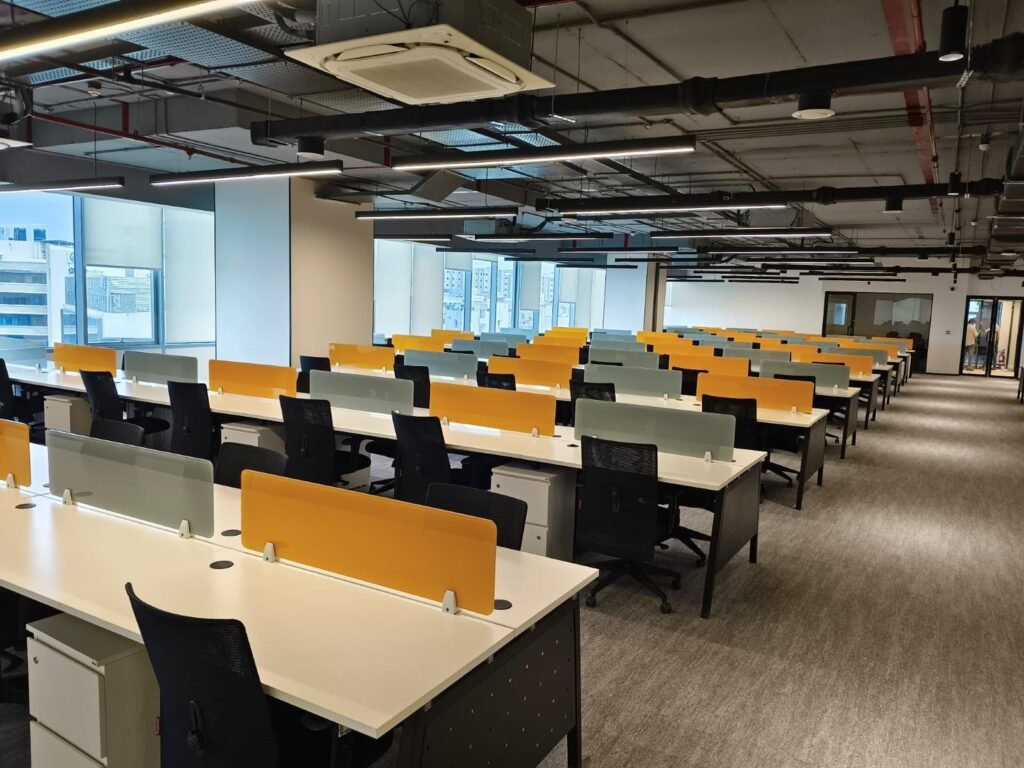
Panel-based workstations use partitions to define individual working areas. The panels can help establish visual separation between employees and create a more organised workspace.
Explore panel-based workstation options when comparing layouts for teams that require defined work areas.
3. Hybrid Workstations
Hybrid workstation layouts combine elements of open desks and partitioned work areas. They may be useful for offices that need a balance between team collaboration and individual concentration.
The right configuration depends on the nature of the work, team structure and available space.
How to Choose the Right Office Workstation Layout
Before selecting a workstation system, measure the usable office area and identify the number of employees who will use the space.
Consider the following factors:
- Team size: Estimate the number of workstations required now and any planned expansion.
- Floor layout: Account for walkways, entrances, meeting rooms, storage and emergency access.
- Work requirements: Different departments may need different desk sizes, privacy levels and storage arrangements.
- Collaboration: Open layouts can support communication, while partitions can provide greater visual separation.
- Future flexibility: Modular systems may make it easier to rearrange work areas when team requirements change.
A layout should be evaluated as a complete workplace plan rather than simply by counting how many desks fit into a room.
Important Features to Compare Before Buying
Desk Size and Work Surface
Choose a desk surface that accommodates the user’s computer, monitor, keyboard, documents and other necessary equipment. Allow enough room for comfortable movement and daily tasks.
Materials and Finish
Compare the materials used for the desktop, frame, panels and edges. Consider durability, maintenance, appearance and suitability for the intended working environment.
Ask suppliers for specifications and finish options before confirming a large order.
Cable Management
Good cable management helps keep power and data cables organised. Depending on the workstation design, useful features may include cable grommets, wire trays and provision for power accessories.
Plan cable routing before installation, especially when multiple workstations share power and data infrastructure.
Privacy and Acoustic Considerations
Partition height and material affect visual separation between work areas. However, workstation partitions alone do not necessarily provide soundproofing.
Choose a configuration that reflects the privacy and communication requirements of your team.
Ergonomics and Comfort
Workstations should support a comfortable working posture. Consider desk height, monitor positioning, legroom and compatibility with adjustable office chairs.
For additional seating guidance, explore our office furniture resources.
Modular Office Workstations for Different Business Environments
Corporate Offices
Corporate offices may require consistent workstation layouts across departments. Modular configurations can help create an organised appearance while accommodating different team sizes.
IT and Technology Teams
Technology teams often need space for monitors, accessories, power connections and data cables. Check the actual equipment requirements before choosing desk dimensions and cable-management options.
Startups and Growing Businesses
Growing teams may benefit from a workstation plan that can accommodate future employees. Compare systems based on the possibility of rearranging or extending the layout.
Administrative Departments
Administrative teams may require additional document space, storage and clearly defined work areas. Select the layout according to daily tasks and equipment requirements.
What Should You Check Before Placing a Bulk Order?
For a corporate office furniture project, evaluate the complete requirement before approving a purchase.
- Confirm the number of workstations and the required dimensions.
- Finalise the floor plan and workstation configuration.
- Review material specifications, colours and finishes.
- Check storage, partition and cable-management requirements.
- Confirm delivery, installation responsibilities and project timelines.
- Request a written quotation covering the agreed specifications.
Comparing suppliers on specifications, service scope and suitability is more useful than comparing prices alone.
Why Work with a Professional Office Furniture Supplier?
A professional office furniture supplier can help businesses evaluate workstation configurations, furniture specifications and project requirements.
Before selecting a supplier, review its product range, experience with projects of a similar size, available customisation options and ability to coordinate delivery and installation where required.
Furniture-India provides a range of office furniture solutions for businesses exploring workstation and corporate furniture requirements. Contact the team to discuss your project specifications and preferred configuration.
Frequently Asked Questions
Which modular office workstation is best for a corporate office?
The right option depends on the floor plan, employee count, work requirements, privacy needs and budget. Desk-based, panel-based and hybrid systems should be compared against these requirements.
Are panel-based workstations suitable for large offices?
They can be suitable for large offices when the layout, panel dimensions, circulation space and employee requirements are planned appropriately.
What features should an office workstation include?
Important considerations include adequate desk space, suitable materials, cable management, legroom, storage where required and compatibility with office chairs.
Can modular workstations be customised?
Customisation depends on the supplier and product system. Ask about available dimensions, finishes, partitions, storage and accessories before confirming your order.
How can I plan workstations for a growing team?
Start with the current headcount and consider anticipated expansion, circulation space, shared facilities and the flexibility of the selected workstation system.
Plan Your Office Workstation Requirement
Choosing modular office workstations begins with understanding your space, employees and day-to-day work requirements. Compare workstation types, check product specifications and plan the complete layout before making a purchasing decision.
Explore Furniture-India for office furniture solutions, or review our panel-based workstation options as part of your planning process.
For a project-specific recommendation, prepare your approximate office area, workstation count and preferred configuration before contacting a supplier.
Editorial note: Review all product and service statements before publication and add project photographs only where you have permission to use them.
Our Seven Locations Across India
- Furniture-India Noida Office — Sector 49 — Noida
BR-47, Friends Enclave, Sector 49, Noida, 201304
Open in Google Maps - Furniture-India Noida Factory — Sector 65 — Noida
C-94, Basement, Sector 65, Noida, 201301
Open in Google Maps - Furniture-India Delhi Office — New Ashok Nagar — Delhi
Flat No. 001, First Floor, Krishna Apartment, Street No. 4, Block B-1, New Ashok Nagar, Delhi, 110096
Open in Google Maps - Furniture-India Delhi Office — Najafgarh — Delhi
C-97A, Main Gopal Nagar, Prem Nagar, Najafgarh, New Delhi, 110043
Open in Google Maps - Furniture-India Gurugram Office — Sector 30 — Gurugram
Unit 003A & 003B, Ground Floor, BPTP Park Centra, Sector 30, Gurugram, 122001
+91 79824 82202
Open in Google Maps - Furniture-India Ghaziabad — Pratap Vihar — Ghaziabad
K-36, Sector 12, Mirzapur, Pratap Vihar, Ghaziabad, 201009
Open in Google Maps - Furniture-India / D Decor Chandigarh — Chandigarh
Chandigarh, India
+91 95400 91799
Open in Google Maps